Kubernetes Gateway API
Kubernetes Ingress 의 뒤를 잇는 인그레스 트래픽 컨트롤 표준!
https://gateway-api.sigs.k8s.io/
Introduction - Kubernetes Gateway API
Introduction Gateway API is an official Kubernetes project focused on L4 and L7 routing in Kubernetes. This project represents the next generation of Kubernetes Ingress, Load Balancing, and Service Mesh APIs. From the outset, it has been designed to be gen
gateway-api.sigs.k8s.io

Gateway API 의 장점
1. 범용!
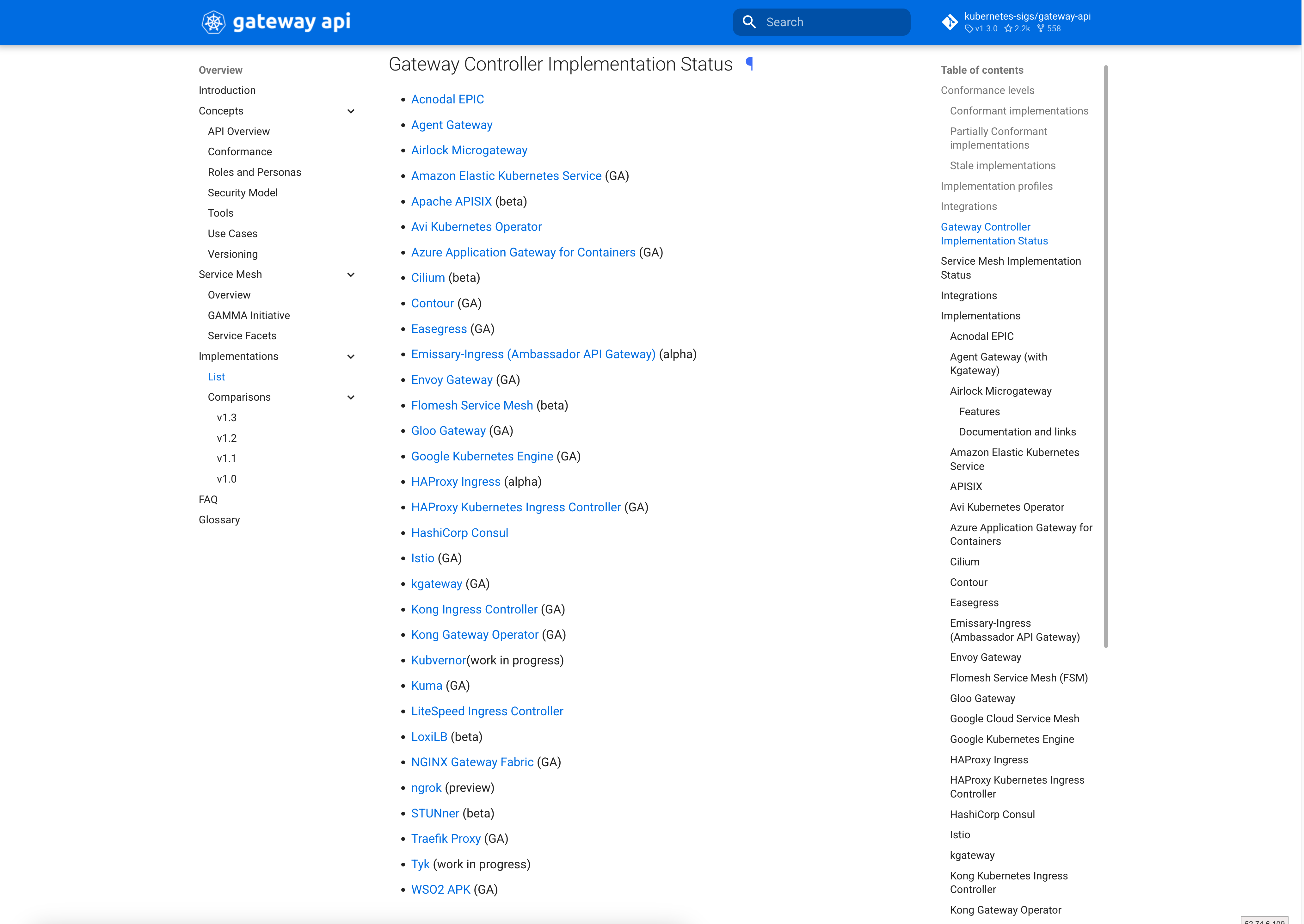
→ 범용 표준 API로 다양한 구현체 파생
https://gateway-api.sigs.k8s.io/implementations/#gateway-controller-implementation-status
List - Kubernetes Gateway API
Implementations This document tracks downstream implementations and integrations of Gateway API and provides status and resource references for them. Implementors and integrators of Gateway API are encouraged to update this document with status information
gateway-api.sigs.k8s.io
2. 다양한 기능!
→ Load Balancer 에서 지원하는 다양한 트래픽 컨트롤 및 HTTP 관련 옵션 제공
3. 확장성!
→ Gateway Controller 에서 지원하는 다양한 CRD를 활용하여 추가 기능 구현
→ GKE Gateway Controller 가 사용하는 Frontend Config / Backend Config
→ Envoy Gateway 가 사용하는 Security Policy / Backend
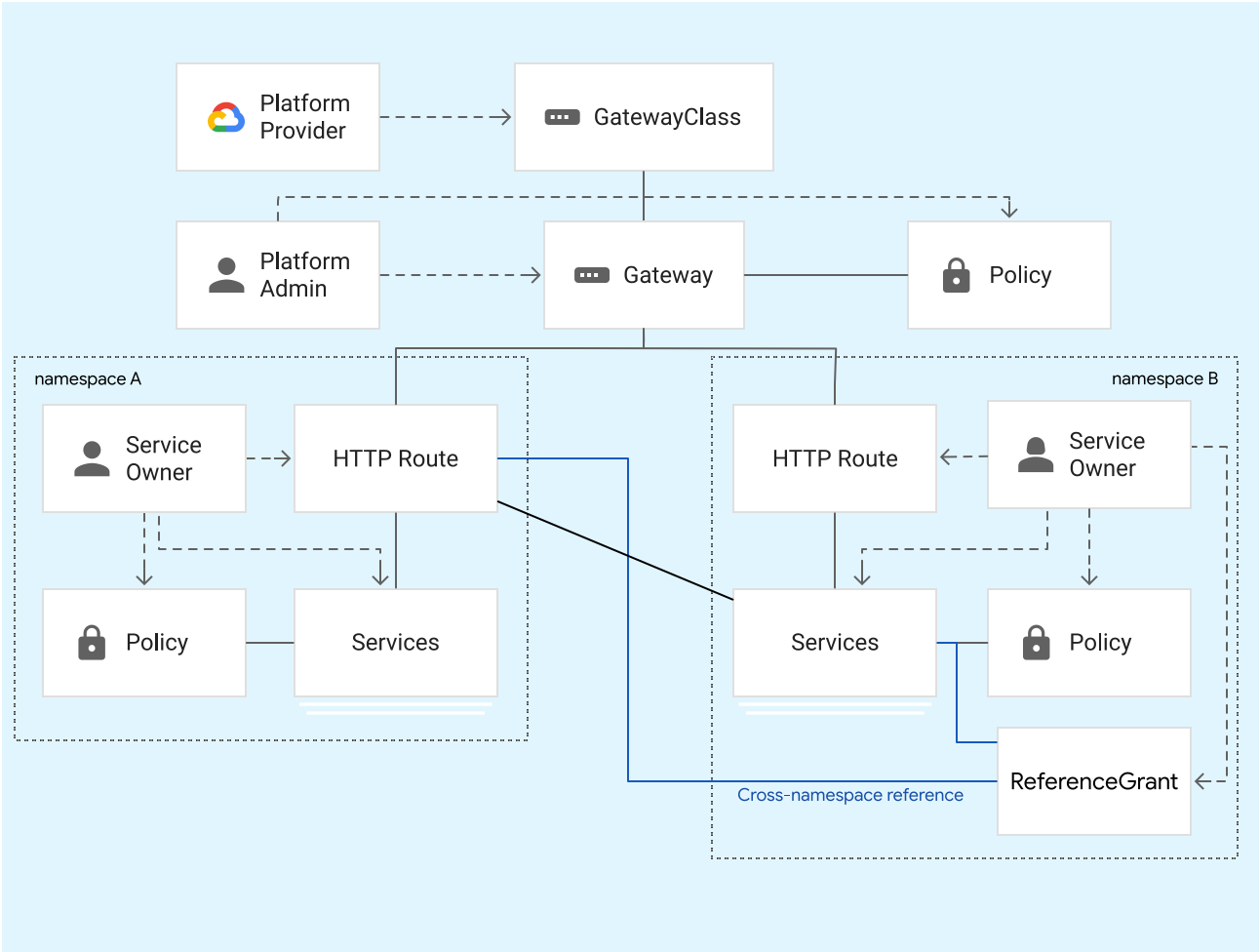
Gateway API 의 구성 요소
1. GatewayClass
→ Ingress 의 IngressClass 와 유사하게 Gateway 가 어떤 Gateway Controller 를 사용하는지 정의하는 리소스
2. Gateway
→ Load Balancer 의 프론트엔드 역할(Public Cloud 에서는 LB가 자동으로 생성된다.)
→ 클라이언트 사이드의 설정을 정의하거나, 모든 백엔드에 공통으로 적용될 백엔드 설정을 정의
3. HTTPRoute
→ 백엔드 설정을 정의
→ 어떤 Gateway 로 들어온 트래픽을 어떤 Service 로 보낼지 정의
4. TCPRoute / TLSRoute / UDPRoute / GRPCRoute
→ HTTPRoute 와 용도가 동일하지만, HTTP 가 아닌 각 프로토콜에 대한 백엔드 설정을 정의
예시) GKE Gateway Controller 로 Gateway API 사용
https://cloud.google.com/kubernetes-engine/docs/concepts/gateway-api?hl=ko
Gateway API 정보 | GKE networking | Google Cloud
의견 보내기 Gateway API 정보 컬렉션을 사용해 정리하기 내 환경설정을 기준으로 콘텐츠를 저장하고 분류하세요. Autopilot Standard 이 페이지에서는 GKE 게이트웨이 컨트롤러를 사용하여 Kubernetes Gatewa
cloud.google.com
Envoy Gateway
Envoy
요즘 가장 핫하게 사용되는 오픈 소스 리버스 프록시는?
→ Envoy!
Envoy proxy - home
"At Lyft, we've made tremendous strides in our resilience and observability since we started deploying Envoy. We're excited to be open sourcing Envoy, and the community that's growing around Envoy will help both Lyft and others adopting a microservices arc
www.envoyproxy.io
https://www.cncf.io/projects/envoy/
Envoy
40 Smooth production releases per day September 30, 2022 How Kubernetes and Linkerd became Lunar's multi-cloud communication backbone Read Case Study
www.cncf.io
우리 생활 속 Envoy…
- Istio
- Google Load Balancer
Envoy Gateway 는 무엇인가
Envoy 로 Kubernetes 의 인그레스 트래픽을 컨트롤하기 위한 게이트웨이
https://gateway.envoyproxy.io/docs/
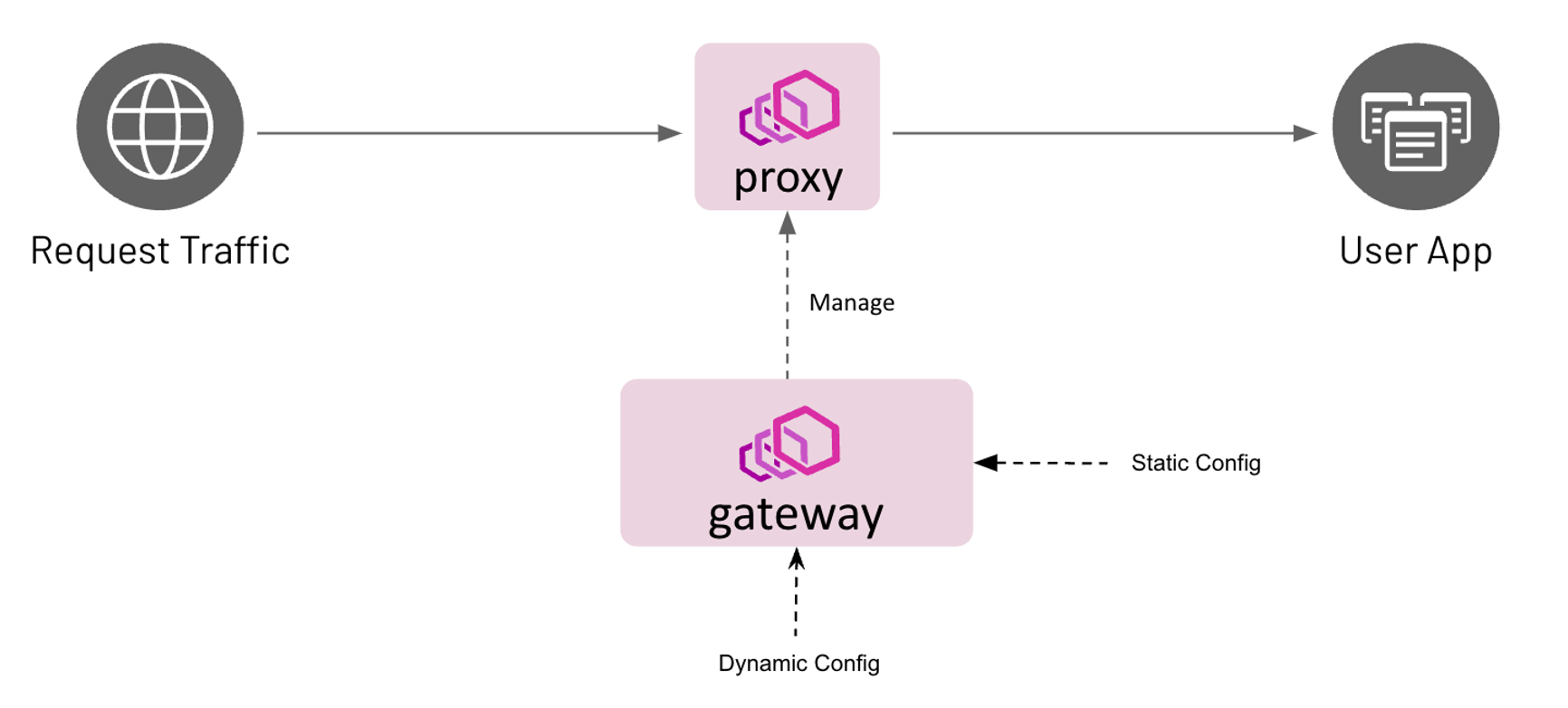
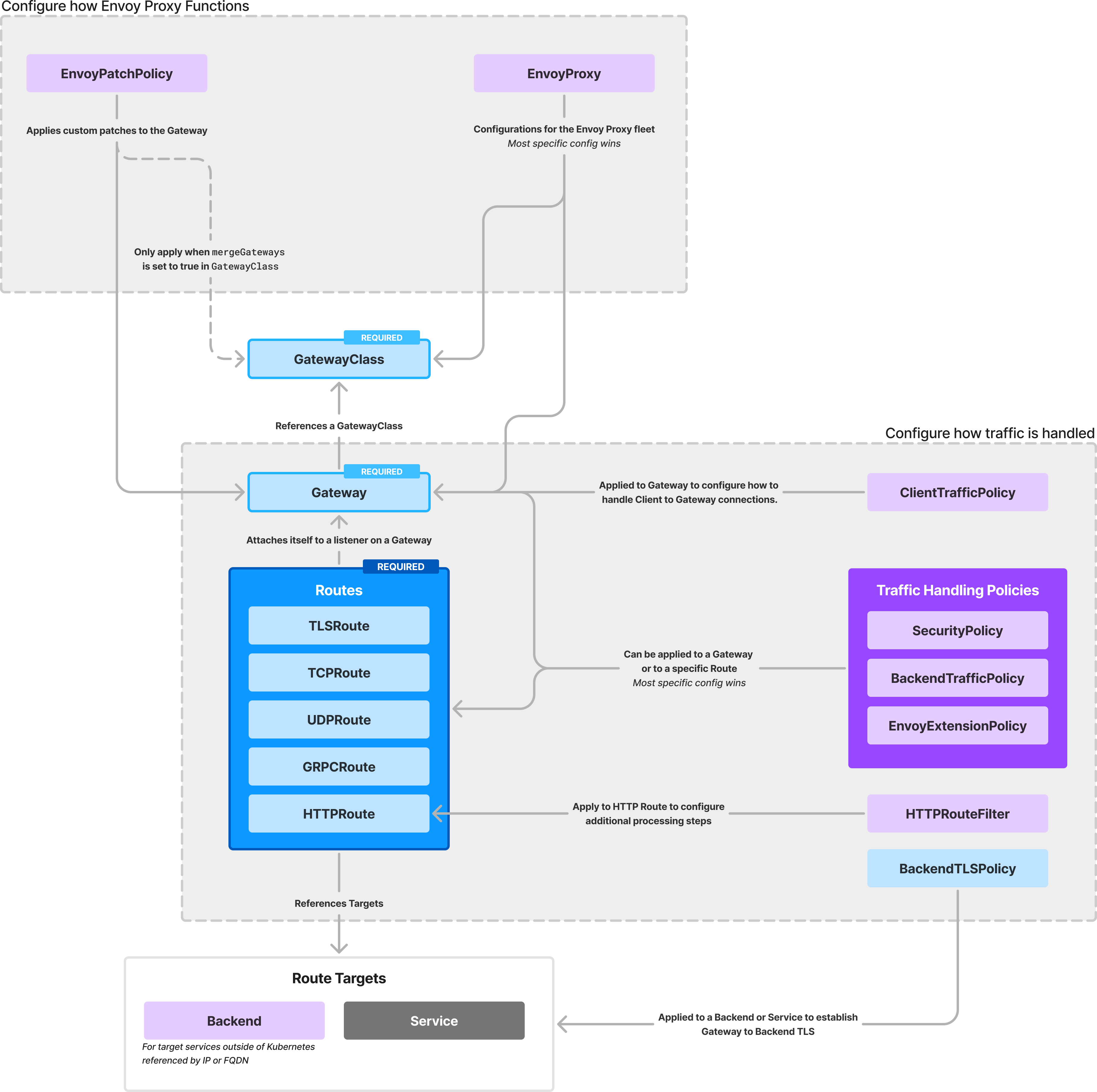
Gateway API 표준을 따르기 때문에 코어 리소스는 동일!
하지만 Envoy Gateway 만의 추가적인 기능을 제공한다.
https://gateway.envoyproxy.io/docs/concepts/concepts_overview/
Envoy Gateway Resources
There are several resources that play a part in enabling you to meet your Kubernetes ingress traffic handling needs. This page provides a brief overview of the resources you’ll be working with. Overview There are several resources that play a part in ena
gateway.envoyproxy.io
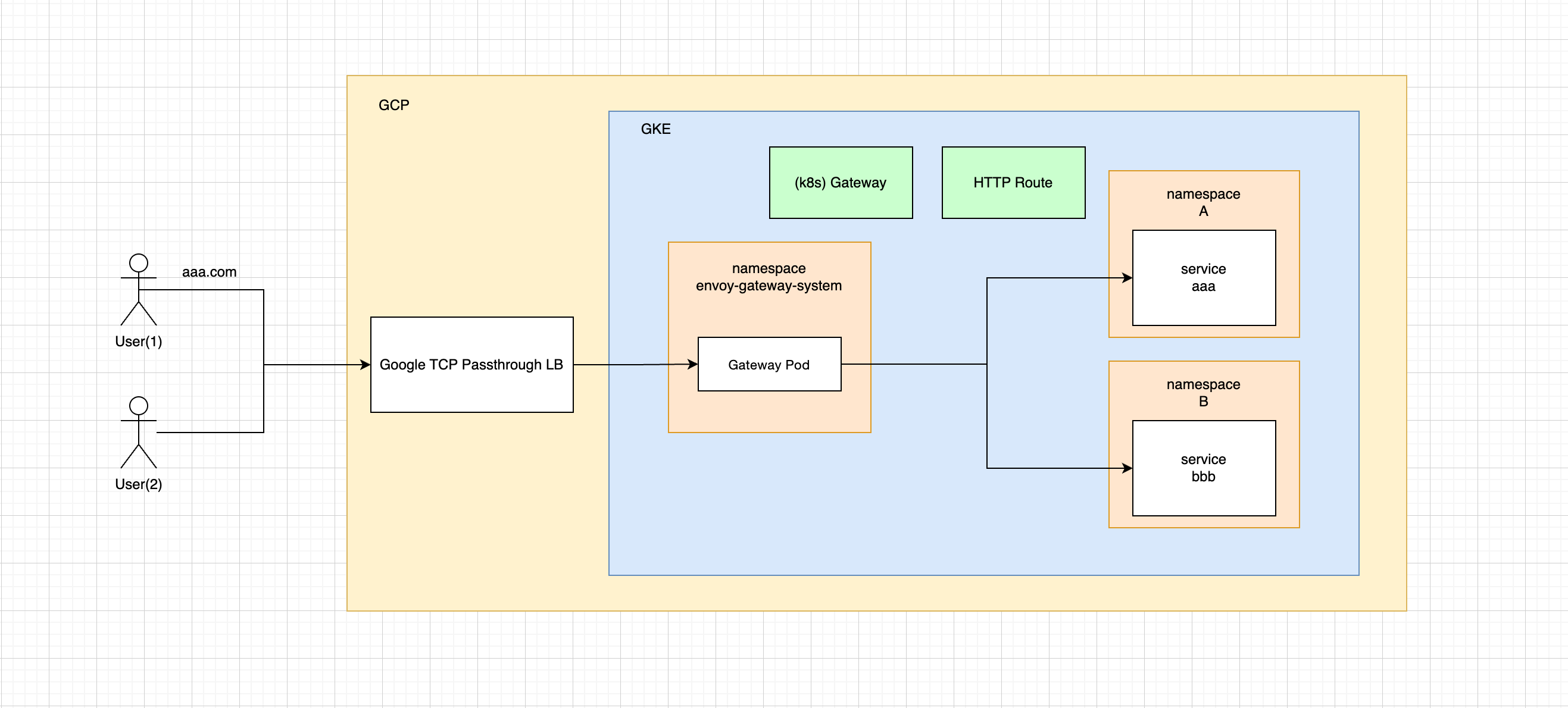
Envoy Gateway 를 Kubernetes 에 배포
https://gateway.envoyproxy.io/docs/install/install-helm/
Install with Helm
Helm is a package manager for Kubernetes that automates the release and management of software on Kubernetes. Envoy Gateway can be installed via a Helm chart with a few simple steps, depending on if you are deploying for the first time, upgrading Envoy Gat
gateway.envoyproxy.io
# Helm 으로 배포

helm install eg oci://docker.io/envoyproxy/gateway-helm --version v1.4.2 -n envoy-gateway-system --create-namespace

kubectl wait --timeout=5m -n envoy-gateway-system deployment/envoy-gateway --for=condition=Available
(참고) 배포된 리소스
-> Controller 역할의 파드만 배포되고, 실제로 트래픽을 처리할 게이트웨이 파드는 Gateway 리소스 정의 시 생성된다.
➜ [~] kubectl get all -n envoy-gateway-system
NAME READY STATUS RESTARTS AGE
pod/envoy-gateway-84b9976c57-k2wfd 1/1 Running 0 5m6s
NAME TYPE CLUSTER-IP EXTERNAL-IP PORT(S) AGE
service/envoy-gateway ClusterIP 10.111.227.106 <none> 18000/TCP,18001/TCP,18002/TCP,19001/TCP,9443/TCP 5m6s
NAME READY UP-TO-DATE AVAILABLE AGE
deployment.apps/envoy-gateway 1/1 1 1 5m6s
NAME DESIRED CURRENT READY AGE
replicaset.apps/envoy-gateway-84b9976c57 1 1 1 5m6s
샘플 워크로드 배포
apiVersion: gateway.networking.k8s.io/v1
kind: GatewayClass
metadata:
  name: eg
spec:
  controllerName: gateway.envoyproxy.io/gatewayclass-controller
---
apiVersion: gateway.networking.k8s.io/v1
kind: Gateway
metadata:
  name: eg
spec:
  gatewayClassName: eg
  listeners:
    - name: http
      protocol: HTTP
      port: 80
---
apiVersion: v1
kind: ServiceAccount
metadata:
  name: backend
---
apiVersion: v1
kind: Service
metadata:
  name: backend
  labels:
    app: backend
    service: backend
spec:
  ports:
    - name: http
      port: 3000
      targetPort: 3000
  selector:
    app: backend
---
apiVersion: apps/v1
kind: Deployment
metadata:
  name: backend
spec:
  replicas: 1
  selector:
    matchLabels:
      app: backend
      version: v1
  template:
    metadata:
      labels:
        app: backend
        version: v1
    spec:
      serviceAccountName: backend
      containers:
        - image: gcr.io/k8s-staging-gateway-api/echo-basic:v20231214-v1.0.0-140-gf544a46e
          imagePullPolicy: IfNotPresent
          name: backend
          ports:
            - containerPort: 3000
          env:
            - name: POD_NAME
              valueFrom:
                fieldRef:
                  fieldPath: metadata.name
            - name: NAMESPACE
              valueFrom:
                fieldRef:
                  fieldPath: metadata.namespace
---
apiVersion: gateway.networking.k8s.io/v1
kind: HTTPRoute
metadata:
  name: backend
spec:
  parentRefs:
    - name: eg
  hostnames:
    - "www.example.com"
  rules:
    - backendRefs:
        - group: ""
          kind: Service
          name: backend
          port: 3000
          weight: 1
      matches:
        - path:
            type: PathPrefix
            value: /
(참고) 배포된 리소스
-> gateway 리소스가 정의되면 자동으로 envoy-gateway-system 네임스페이스에 게이트웨이 deployment 가 생성됨
➜ [~] kubectl get all -n envoy-gateway-system
NAME READY STATUS RESTARTS AGE
pod/envoy-default-eg-e41e7b31-694d7976f-nnvjg 2/2 Running 0 13s
pod/envoy-gateway-84b9976c57-k2wfd 1/1 Running 0 6m3s
NAME TYPE CLUSTER-IP EXTERNAL-IP PORT(S) AGE
service/envoy-default-eg-e41e7b31 LoadBalancer 10.106.210.251 localhost 80:30253/TCP 14s
service/envoy-gateway ClusterIP 10.111.227.106 <none> 18000/TCP,18001/TCP,18002/TCP,19001/TCP,9443/TCP 6m4s
NAME READY UP-TO-DATE AVAILABLE AGE
deployment.apps/envoy-default-eg-e41e7b31 1/1 1 1 14s
deployment.apps/envoy-gateway 1/1 1 1 6m4s
NAME DESIRED CURRENT READY AGE
replicaset.apps/envoy-default-eg-e41e7b31-694d7976f 1 1 1 14s
replicaset.apps/envoy-gateway-84b9976c57 1 1 1 6m4s
➜ [~] kubectl get all -n default
NAME READY STATUS RESTARTS AGE
pod/backend-869c8646c5-qphgz 1/1 Running 0 45s
NAME TYPE CLUSTER-IP EXTERNAL-IP PORT(S) AGE
service/backend ClusterIP 10.97.155.127 <none> 3000/TCP 45s
service/kubernetes ClusterIP 10.96.0.1 <none> 443/TCP 10d
NAME READY UP-TO-DATE AVAILABLE AGE
deployment.apps/backend 1/1 1 1 45s
NAME DESIRED CURRENT READY AGE
replicaset.apps/backend-869c8646c5 1 1 1 45s
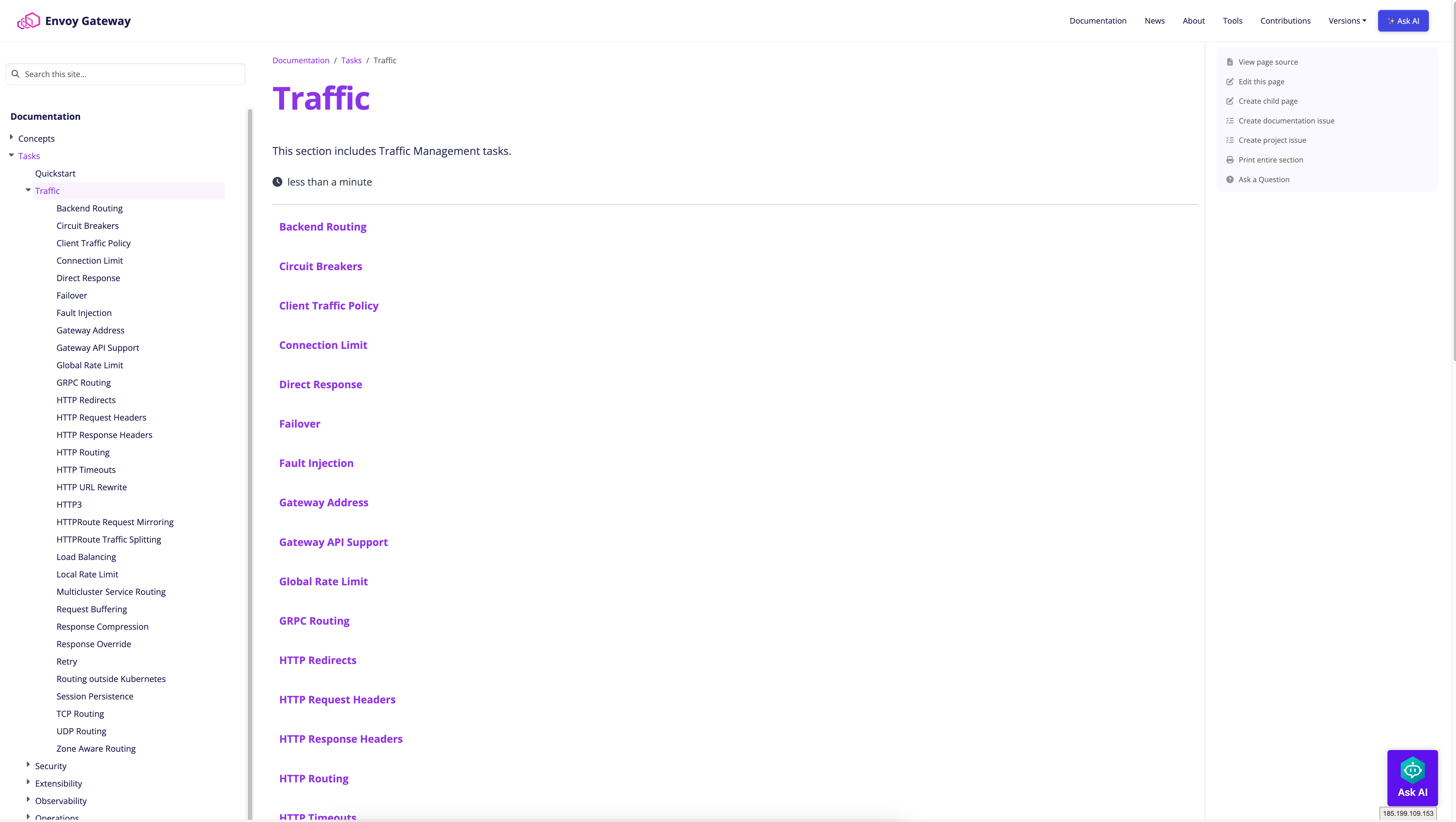
Traffic Control
https://gateway.envoyproxy.io/docs/tasks/traffic/
Traffic
This section includes Traffic Management tasks.
gateway.envoyproxy.io
트래픽 컨트롤 맛집 Envoy!
Istio… 낯익은 그의 향기…
# Circuit Breakers

---
apiVersion: gateway.envoyproxy.io/v1alpha1
kind: BackendTrafficPolicy
metadata:
  name: circuitbreaker-for-route
spec:
  targetRefs:
    - group: gateway.networking.k8s.io
      kind: HTTPRoute
      name: backend
  circuitBreaker:
    maxPendingRequests: 0
    maxParallelRequests: 10
# Connection Limit
---
apiVersion: gateway.envoyproxy.io/v1alpha1
kind: ClientTrafficPolicy
metadata:
name: connection-limit-ctp
namespace: default
spec:
targetRefs:
- group: gateway.networking.k8s.io
kind: Gateway
name: eg
connection:
connectionLimit:
value: 5
# Fault Injection

---
apiVersion: gateway.envoyproxy.io/v1alpha1
kind: BackendTrafficPolicy
metadata:
  name: fault-injection-50-percent-abort
spec:
  targetRefs:
  - group: gateway.networking.k8s.io
    kind: HTTPRoute
    name: foo
  faultInjection:
    abort:
      httpStatus: 501
      percentage: 50
---
apiVersion: gateway.envoyproxy.io/v1alpha1
kind: BackendTrafficPolicy
metadata:
  name: fault-injection-delay
spec:
  targetRefs:
  - group: gateway.networking.k8s.io
    kind: HTTPRoute
    name: bar
  faultInjection:
    delay:
      fixedDelay: 2s
그 외에도…
뭘 좋아할지 몰라서 다 준비했어!
Traffic Control - Dynamic Forward Proxy
https://gateway.envoyproxy.io/docs/tasks/traffic/backend/
Backend Routing
Envoy Gateway supports routing to native K8s resources such as Service and ServiceImport. The Backend API is a custom Envoy Gateway extension resource that can used in Gateway-API BackendObjectReference. Motivation The Backend API was added to support seve
gateway.envoyproxy.io
https://www.envoyproxy.io/docs/envoy/latest/intro/arch_overview/http/http_proxy
Envoy Gateway 를 Kubernetes 외부의 엔드포인트를 백엔드로 하는 동적인 포워드 프록시로 사용!
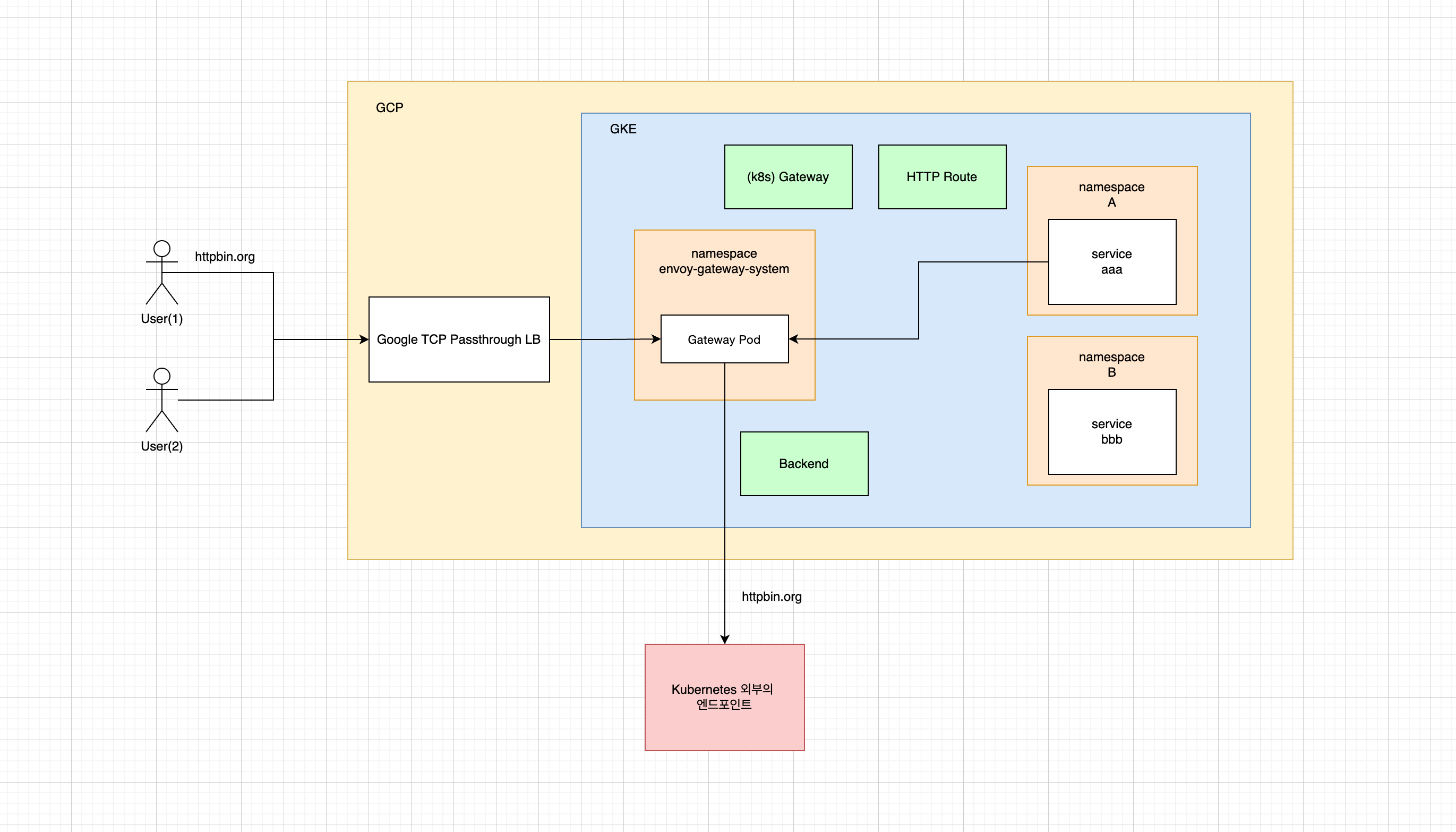
Kubernetes 외부로 요청을 전송할 수도 있고, Dynamic 방식으로 동작하도록 설정하면 Envoy Gateway 를 통해 어디로든 갈 수 있기 때문에 기본적으로 Backend API는 비활성화되어 있다.
apiVersion: v1
kind: ConfigMap
metadata:
  name: envoy-gateway-config
  namespace: envoy-gateway-system
data:
  envoy-gateway.yaml: |
    apiVersion: gateway.envoyproxy.io/v1alpha1
    kind: EnvoyGateway
    provider:
      type: Kubernetes
    gateway:
      controllerName: gateway.envoyproxy.io/gatewayclass-controller
    extensionApis:
      enableBackend: true # Backend API 활성화!
어디로든 문 활성화!
---
apiVersion: gateway.networking.k8s.io/v1
kind: HTTPRoute
metadata:
  name: dynamic-forward-proxy
spec:
  parentRefs:
    - name: eg
  rules:
    - backendRefs:
      - group: gateway.envoyproxy.io
        kind: Backend
        name: backend-dynamic-resolver
---
apiVersion: gateway.envoyproxy.io/v1alpha1
kind: Backend
metadata:
  name: backend-dynamic-resolver
spec:
  type: DynamicResolver
  tls:
    wellKnownCACertificates: System
# 호출 테스트

export GATEWAY_HOST=$(kubectl get gateway/eg -n default -o jsonpath='{.status.addresses[0].value}')

curl -v -H 'Host: httpbin.org' http://$GATEWAY_HOST/headers
Security
뭘 좋아할지 몰라서 다 준비했어!(2)
→ 단순히 인그레스 트래픽을 전달하는 기능뿐만 아니라, 원래는 애플리케이션의 일부로 구현해야하는 기능을 게이트웨이가 대신 처리!
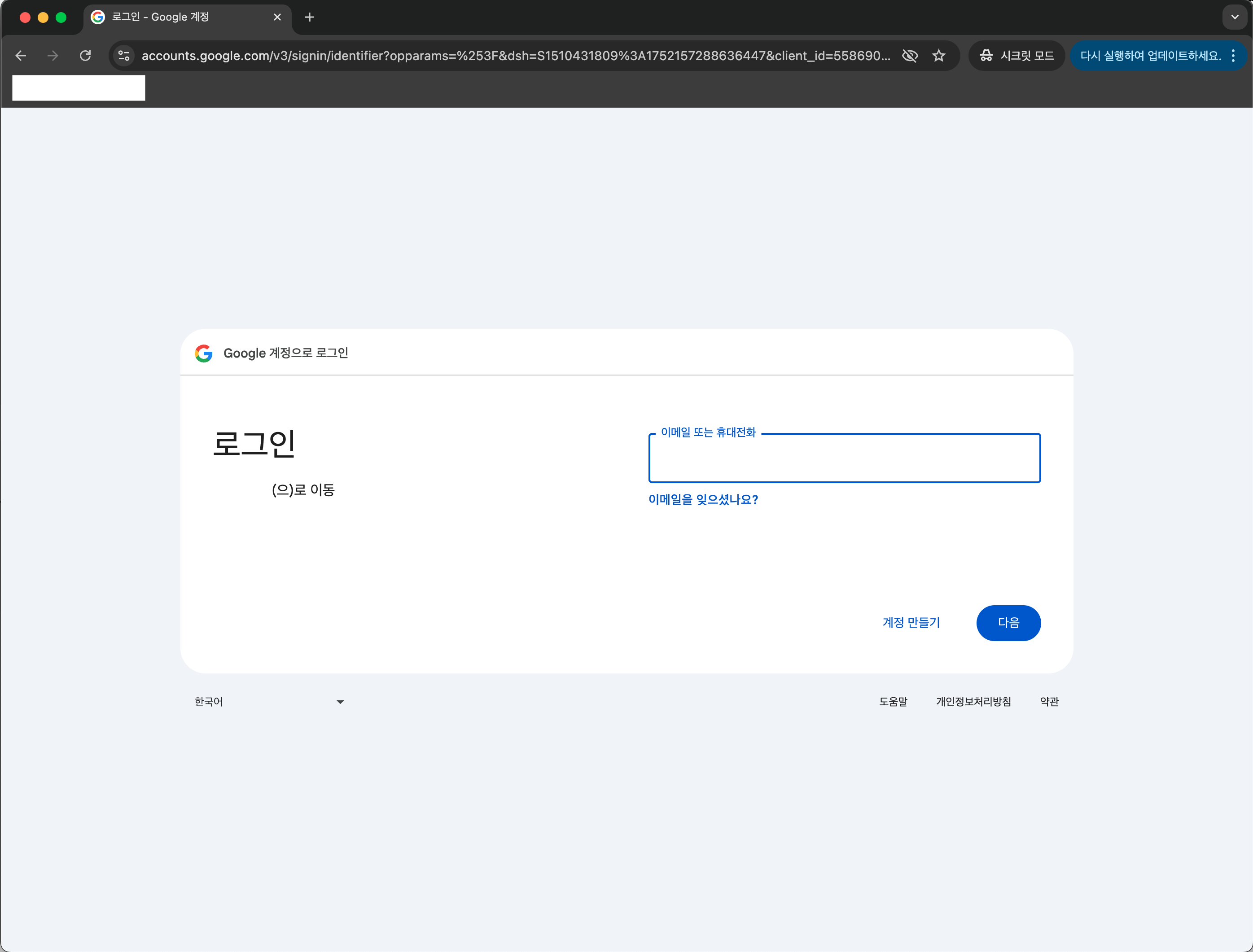
Security - OIDC Authentication
https://gateway.envoyproxy.io/docs/tasks/security/oidc/
OIDC Authentication
This task provides instructions for configuring OpenID Connect (OIDC) authentication. OpenID Connect (OIDC) is an authentication standard built on top of OAuth 2.0. It enables EG to rely on authentication that is performed by an OpenID Connect Provider (OP
gateway.envoyproxy.io
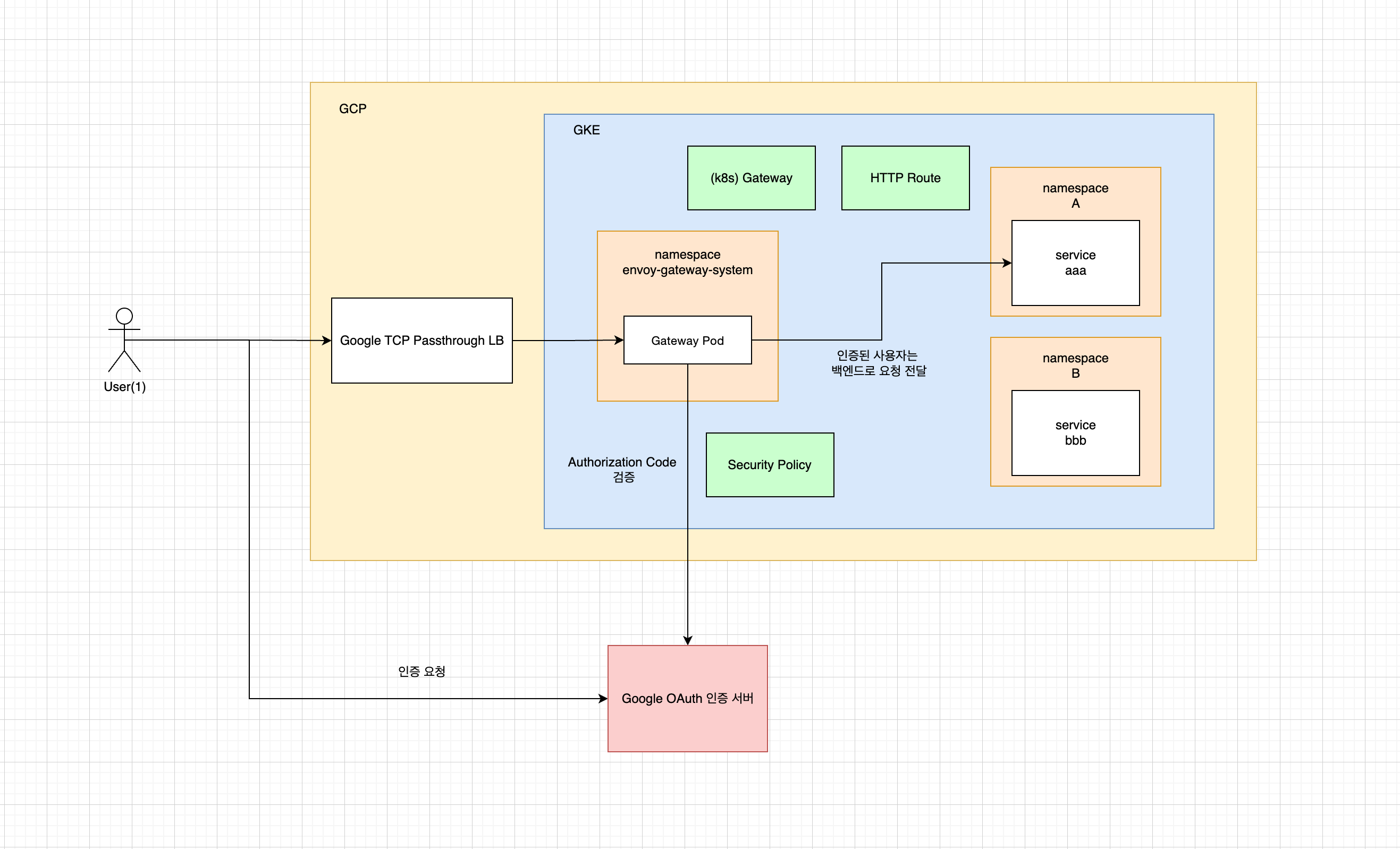
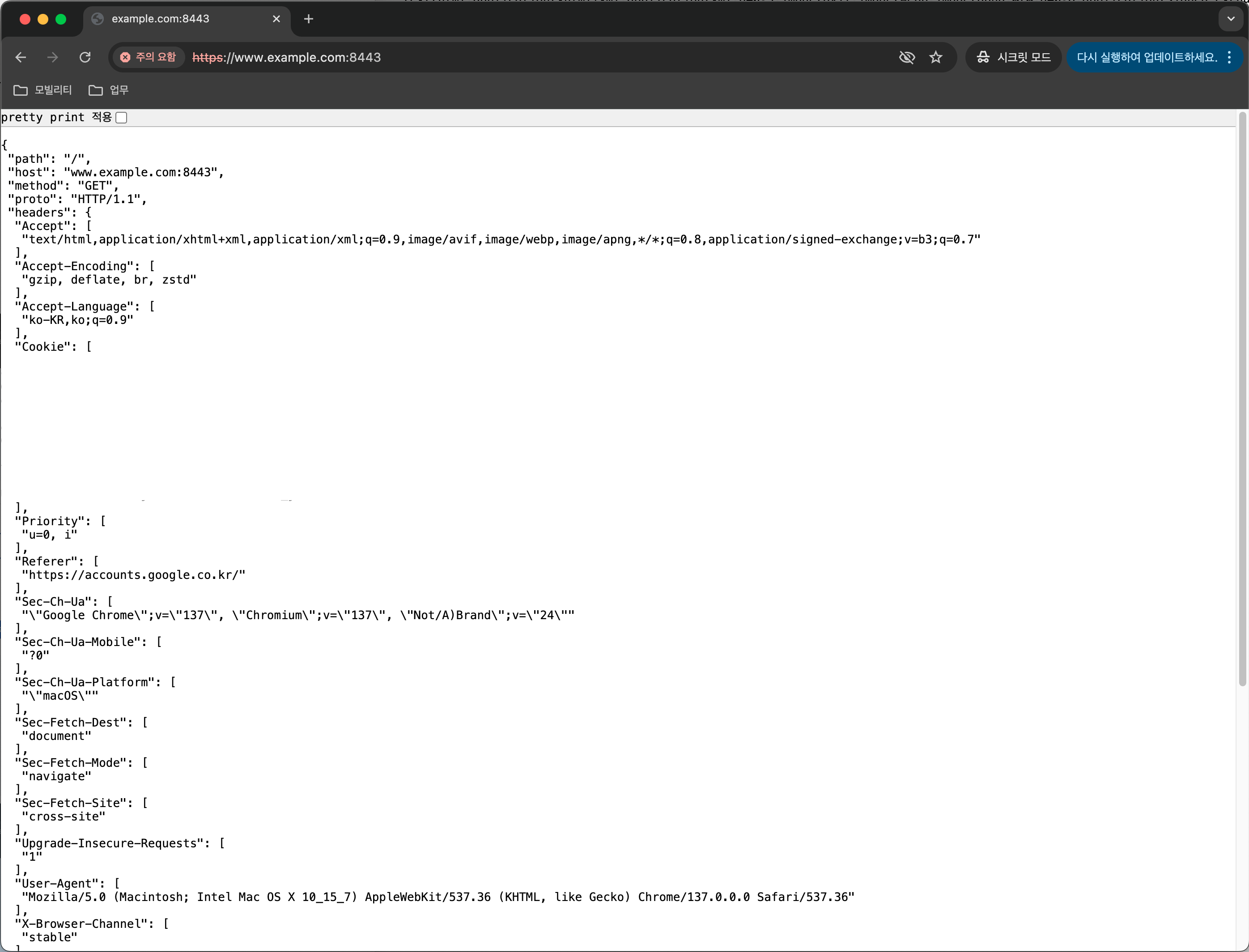
애플리케이션에 OIDC 인증과 관련된 코드 한 줄 없이 Google OAuth 와 같은 OIDC 인증을 적용!
→ Istio 도 유사한 기능이 있지만 반드시 OAuth2-Proxy 를 별도로 연동해야 가능
→ Envoy Gateway 는 별도 OAuth2-Proxy 없이 공짜로 가능하다!
→ GCP 의 IAP Proxy 와 유사한 기능
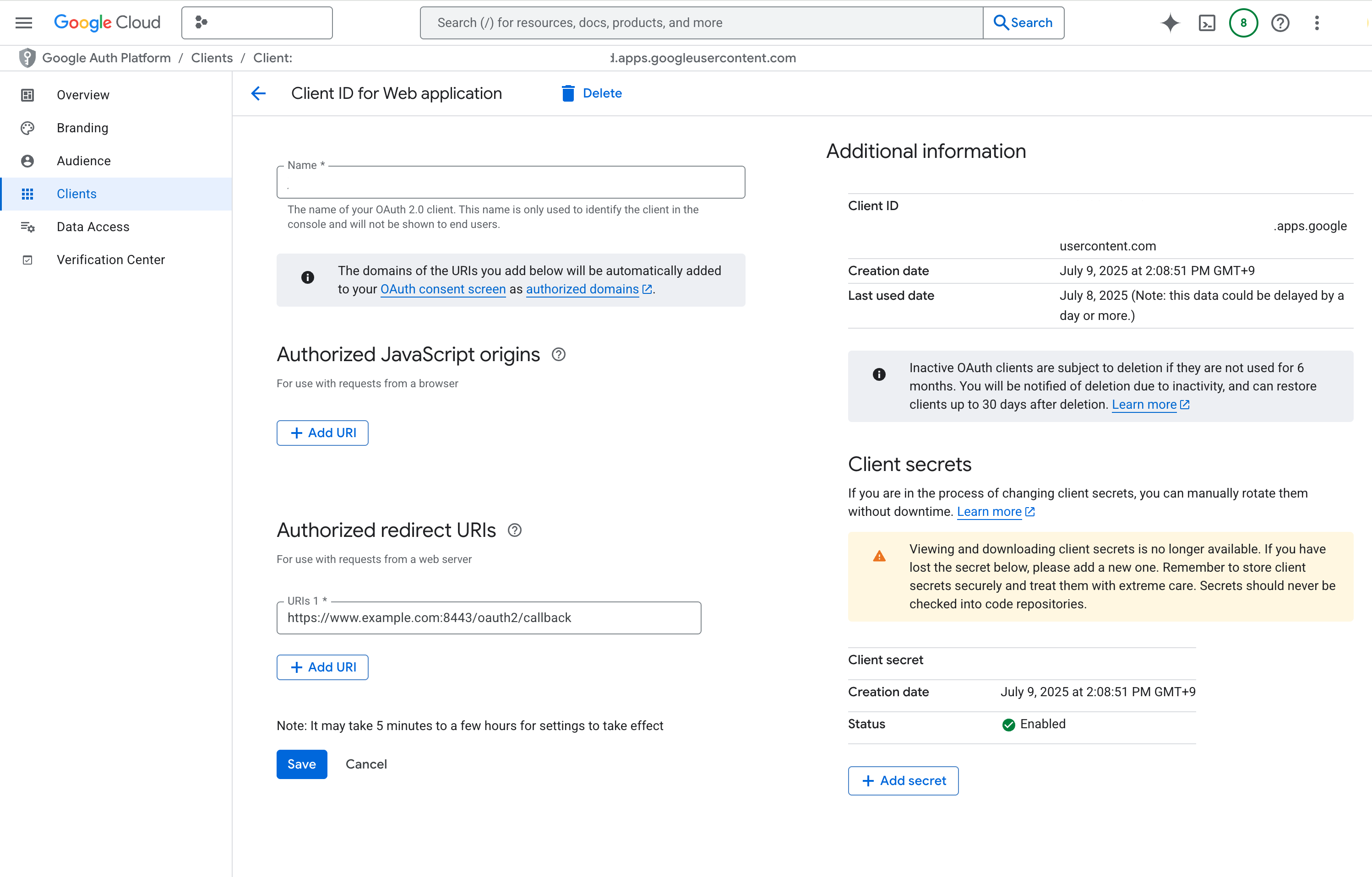
# oauth client secret 으로 시크릿 생성

kubectl create secret generic my-app-client-secret --from-literal=client-secret=${CLIENT_SECRET}
# security policy 생성

apiVersion: gateway.envoyproxy.io/v1alpha1
kind: SecurityPolicy
metadata:
  name: oidc-example
spec:
  targetRefs:
    - group: gateway.networking.k8s.io
      kind: HTTPRoute
      name: backend
  oidc:
    provider:
      issuer: "https://accounts.google.com"
    clientID: "{CLIENT_ID}"
    clientSecret:
      name: "my-app-client-secret"
    redirectURL: "https://www.example.com:8443/oauth2/callback"
    logoutPath: "/logout"
# 접속 테스트
export ENVOY_SERVICE=$(kubectl get svc -n envoy-gateway-system --selector=gateway.envoyproxy.io/owning-gateway-namespace=default,gateway.envoyproxy.io/owning-gateway-name=eg -o jsonpath='{.items[0].metadata.name}')
kubectl -n envoy-gateway-system port-forward service/$ENVOY_SERVICE 8443:443
브라우저에서 접속!
Security - JWT Authentication
https://gateway.envoyproxy.io/docs/tasks/security/jwt-authentication/
JWT Authentication
This task provides instructions for configuring JSON Web Token (JWT) authentication. JWT authentication checks if an incoming request has a valid JWT before routing the request to a backend service. Currently, Envoy Gateway only supports validating a JWT f
gateway.envoyproxy.io
https://gateway.envoyproxy.io/docs/tasks/security/jwt-claim-authorization/
JWT Claim-Based Authorization
This task provides instructions for configuring JWT claim-based authorization. JWT claim-based authorization checks if an incoming request has the required JWT claims before routing the request to a backend service. Envoy Gateway introduces a new CRD calle
gateway.envoyproxy.io
애플리케이션에 JWT 인증과 관련된 코드 한 줄 없이 원하는 경로에 JWT 인증을 적용!

apiVersion: gateway.envoyproxy.io/v1alpha1
kind: SecurityPolicy
metadata:
  name: jwt-example
spec:
  targetRef:
    group: gateway.networking.k8s.io
    kind: HTTPRoute
    name: foo
  jwt:
    providers:
    - name: example
      remoteJWKS:
        uri: https://raw.githubusercontent.com/envoyproxy/gateway/main/examples/kubernetes/jwt/jwks.json # JWT 검증에 사용할 퍼블릭 키가 포함된 Json Web Key
---
apiVersion: gateway.networking.k8s.io/v1
kind: HTTPRoute
metadata:
  name: foo
spec:
  parentRefs:
  - name: eg
  hostnames:
  - "www.example.com"
  rules:
  - backendRefs:
    - group: ""
      kind: Service
      name: backend
      port: 3000
      weight: 1
    matches:
    - path:
        type: PathPrefix
        value: /foo
---
apiVersion: gateway.networking.k8s.io/v1
kind: HTTPRoute
metadata:
  name: bar
spec:
  parentRefs:
  - name: eg
  hostnames:
  - "www.example.com"
  rules:
  - backendRefs:
    - group: ""
      kind: Service
      name: backend
      port: 3000
      weight: 1
    matches:
    - path:
        type: PathPrefix
        value: /bar
# 호출 테스트
export GATEWAY_HOST=$(kubectl get gateway/eg -o jsonpath='{.status.addresses[0].value}')
curl -sS -o /dev/null -H "Host: www.example.com" -w "%{http_code}\n" http://$GATEWAY_HOST/foo# 인증 토큰이 없는 경우
➜ [envoy-gateway] curl -v http://www.example.com/foo
* Host www.example.com:80 was resolved.
* IPv6: (none)
* IPv4: 127.0.0.1
* Trying 127.0.0.1:80...
* Connected to www.example.com (127.0.0.1) port 80
> GET /foo HTTP/1.1
> Host: www.example.com
> User-Agent: curl/8.6.0
> Accept: */*
>
< HTTP/1.1 401 Unauthorized
< www-authenticate: Bearer realm="http://www.example.com/foo"
< content-length: 14
< content-type: text/plain
< date: Wed, 09 Jul 2025 06:54:17 GMT
<
* Connection #0 to host www.example.com left intact
Jwt is missing# 인증 토큰이 있는 경우
TOKEN=$(curl https://raw.githubusercontent.com/envoyproxy/gateway/main/examples/kubernetes/jwt/test.jwt -s) && echo "$TOKEN" | cut -d '.' -f2 - | base64 --decode
curl -sS -o /dev/null -H "Host: www.example.com" -H "Authorization: Bearer $TOKEN" -w "%{http_code}\n" http://$GATEWAY_HOST/foo
➜ [envoy-gateway] curl -v -H "Authorization: Bearer $TOKEN" http://www.example.com/foo
* Host www.example.com:80 was resolved.
* IPv6: (none)
* IPv4: 127.0.0.1
* Trying 127.0.0.1:80...
* Connected to www.example.com (127.0.0.1) port 80
> GET /foo HTTP/1.1
> Host: www.example.com
> User-Agent: curl/8.6.0
> Accept: */*
> Authorization: Bearer eyJhbGci...y942XheVLmGwLMBkQ
>
< HTTP/1.1 200 OK
< content-type: application/json
< x-content-type-options: nosniff
< date: Wed, 09 Jul 2025 06:58:30 GMT
< content-length: 982
<
{
"path": "/foo",
"host": "www.example.com",
"method": "GET",
"proto": "HTTP/1.1",
"headers": {
"Accept": [
"*/*"
],
"Authorization": [
"Bearer eyJhbGci...y942XheVLmGwLMBkQ"
],
"User-Agent": [
"curl/8.6.0"
],
"X-Envoy-External-Address": [
"192.168.65.3"
],
"X-Forwarded-For": [
"192.168.65.3"
],
"X-Forwarded-Proto": [
"http"
],
"X-Request-Id": [
"2e286dd2-6f1f-49f5-9d55-fc5e81141dff"
]
},
"namespace": "default",
"ingress": "",
"service": "",
"pod": "backend-869c8646c5-wp8jj"
* Connection #0 to host www.example.com left intact
}%# 로컬의 jwks 사용도 가능!
apiVersion: gateway.envoyproxy.io/v1alpha1
kind: SecurityPolicy
metadata:
name: jwt-example
spec:
targetRef:
group: gateway.networking.k8s.io
kind: HTTPRoute
name: foo
jwt:
providers:
- name: example
localJWKS:
type: ValueRef
valueRef:
group: ""
kind: ConfigMap
name: jwt-local-jwks
---
apiVersion: v1
kind: ConfigMap
metadata:
name: jwt-local-jwks
data:
jwks: |
{
"keys": [
{
"alg": "RS256",
"e": "AQAB",
"key_ops": [
"verify"
],
"kty": "RSA",
"n": "xOHb-i1WDfeAv...Cgqw-P",
"use": "sig",
"kid": "b520b3c2c4bd75a10e9cebc9576933dc"
}
]
}끝!
'kubernetes' 카테고리의 다른 글
| Argo Rollouts Analysis (0) | 2025.12.09 |
|---|---|
| OPA Gatekeeper 와 Kyverno (0) | 2025.04.29 |
| Istio ambient mode (0) | 2025.01.04 |
| Istio CNI 플러그인과 Pod Security Admission (1) | 2024.06.15 |
| ksniff 로 kubernetes 컨테이너 패킷 캡쳐 (1) | 2024.04.06 |

